Controlling Junior's Cost
Junior's salary maps to AI compute. Learn how to understand and reduce token usage costs.
Junior's salary maps to AI compute (tokens). Here's how to understand and manage costs.
How Costs Work
Every message Junior processes uses tokens. Thinking, tool calls, reading files, and generating responses all consume tokens. More complex tasks use more tokens.
The Biggest Factor: Model Choice
Junior can run on different AI models. The model you choose has the largest impact on cost.
| Model | Input Cost | Output Cost | Best For |
|---|---|---|---|
| Opus | $15 per million tokens | $75 per million tokens | Complex reasoning, nuanced writing, difficult tasks |
| Sonnet | $3 per million tokens | $15 per million tokens | Most everyday tasks, summaries, emails, research |
Sonnet is 5x cheaper than Opus and handles the majority of tasks well.
How to Switch Models
- Change the default: Tell Junior "Switch to Sonnet as your default model"
- Use Opus for specific tasks: Say "Use Opus for this task" when you need deeper reasoning
What Burns Tokens Fast
- Long thinking chains with many tool calls (complex multi-step tasks)
- Processing large files, especially repeatedly
- Opus model (5x more expensive per token)
- Unnecessary channel responses (Junior replying in channels when not directly needed)
Quick Wins to Reduce Cost
| Action | Impact |
|---|---|
| Switch default model to Sonnet | Biggest impact |
| Tell Junior "Only respond in channels when @mentioned" | High |
| Avoid asking Junior to re-process large documents | Medium |
| Be specific in your requests (less back-and-forth) | Medium |
How to Check Usage
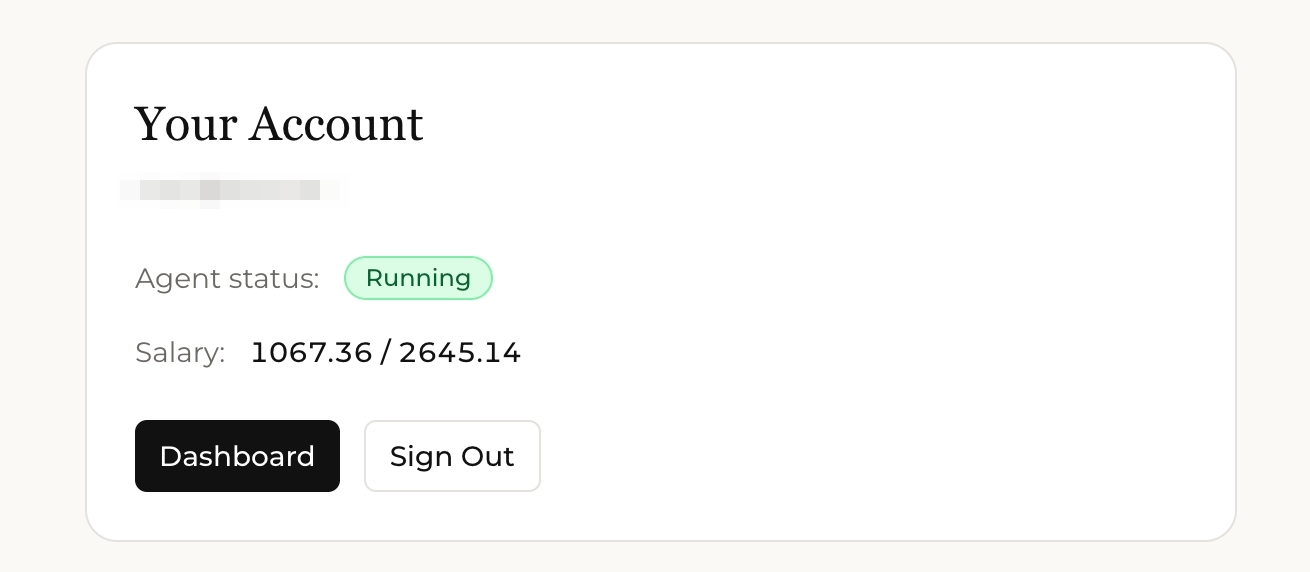
- Your account page shows your current spend vs. budget
- Ask Junior: "How much budget do I have left?" for a quick check
- Need to add more budget? See Managing Junior's Budget
Start with Sonnet as your default. Switch to Opus only for tasks that genuinely need it: complex analysis, important writing, or multi-step reasoning. This alone can cut your costs by 50-80%.